
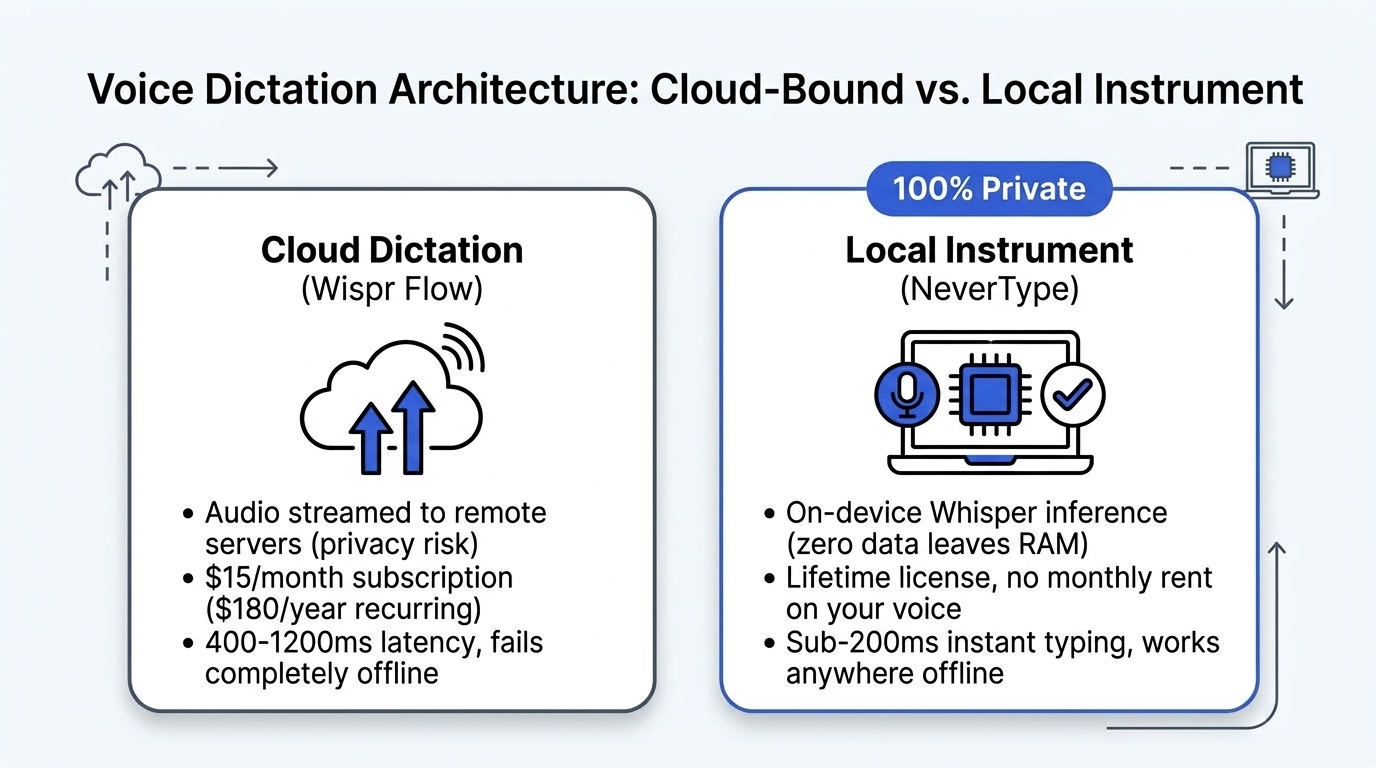
Wispr Flow proved something important in 2024: voice dictation does not have to feel like Siri from 2012. You speak naturally, pauses and filler words get cleaned up, and formatted sentences appear inside your active app.
That core interaction works. But Wispr Flow made an architectural choice that is creating serious problems for developers, founders, lawyers, and writers: every word you speak is sent to a remote cloud server for processing.
When you dictate an email with sensitive client figures, draft code for a proprietary repository, or voice-memo an NDA-protected product roadmap, that raw audio streams across the public internet.
Beyond the privacy risk, Wispr Flow charges $12 to $15 every month. You are essentially paying $180 a year to rent software that transcribes words spoken in your own office.
We built NeverType as a fundamentally different instrument: 100% local, powered by optimized Whisper models running on your machine's hardware, with sub-200ms latency, zero internet connection required, and lifetime ownership options.
Here is an honest, technical breakdown of how NeverType and Wispr Flow compare across privacy, speed, reliability, and pricing.
1. Cloud WebSockets vs. On-Device Metal Compute
The fundamental difference between Wispr Flow and NeverType is architectural. Everything else stems from this decision.
Wispr Flow (Cloud-First)
When you hold down the hotkey in Wispr Flow, your microphone opens an audio stream. That audio is compressed, packetized, and sent via WebSockets to remote cloud inference servers (usually running on AWS or RunPod GPU clusters). The remote server runs the speech-to-text model, formats the text with an LLM pass, and sends the string back down to your computer, which then injects it into your cursor location.
This architecture introduces four points of failure:
- Your local Wi-Fi router
- Internet service provider routing
- The cloud provider's ingress and API latency
- Cloud inference queue times during peak traffic hours
NeverType (Local Instrument)
NeverType runs the model directly on your computer's silicon. On modern Macs, it leverages Apple Silicon's unified memory architecture and Metal Performance Shaders (MPS). On Windows and Linux, it uses optimized ONNX and TensorRT runtimes across NVIDIA GPUs or AVX-512 CPU instructions.
When you speak, the audio buffer is processed entirely in your machine's RAM. Zero audio packets are created. Zero bytes touch a network card. When the inference completes, the text is handed directly to the OS accessibility API and pasted into your active cursor.
Because there is no network hop, NeverType works identically whether you are connected to gigabit fiber or sitting in an airplane at 35,000 feet with Wi-Fi turned off.
2. Latency: Why Sub-200ms Dictation Feels Different
In voice typing, latency is not just a benchmark number. It dictates whether you can actually use the tool while maintaining a train of thought.
Cognitive psychologists note that human conversational response time sits around 200 milliseconds. When an interface responds within that window, your brain perceives it as direct manipulation. When latency pushes past 500 milliseconds, you enter the "waiting loop" — you stop talking, look at the screen, wait for the cursor to catch up, verify the words, and only then resume thinking.
| Metric | Wispr Flow (Cloud) | NeverType (Local-First) |
|---|---|---|
| Typical Latency | 450ms – 1,200ms | 140ms – 210ms |
| Network Dependency | Requires active high-speed connection | None (100% offline) |
| Packet Loss Penalty | Words drop or buffer on weak Wi-Fi | Impossible (local memory buffer) |
| Peak Hour Degradation | Yes (server queue backpressure) | None (dedicated local hardware) |
| Audio Data Destination | Remote cloud servers | Never leaves device RAM |
With Wispr Flow on an average office Wi-Fi connection, you hold the button, dictate two sentences, release, and wait 600 to 900 milliseconds before the text drops in. On coffee shop or hotel networks, that gap easily stretches past 1.5 seconds.
With NeverType, speech transcription is already completed by the time your finger lifts off the key. You stay in flow because you never have to wait to see if the computer heard you.
3. The Privacy Problem Nobody Reads in the Terms of Service
Most professionals do not realize how much sensitive data passes through their microphone on an average Tuesday:
- Software engineers: Variable names, API endpoints, internal service keys, and proprietary logic discussed in commit messages.
- Founders and executives: Unannounced acquisition talks, valuation discussions, runway figures, and hiring decisions.
- Lawyers and advisors: Privileged client conversations and litigation strategies.
- Doctors and clinicians: Patient health records and diagnostic observations protected under HIPAA.
When using cloud dictation software, your audio leaves your computer. Even when providers claim they do not train models on your data, the audio must still be decrypted in memory on a shared multi-tenant server, creating an external attack surface and data-residency compliance liabilities under GDPR, SOC2 Type II, and California privacy regulations.
NeverType operates on a strict zero-telemetry doctrine:
- Your audio buffer exists only in volatile RAM during active recording.
- The transcript is generated locally and handed to your operating system.
- No voice samples, no transcripts, and no metadata are ever transmitted to NeverType servers or any third-party AI provider.
- You can block NeverType in your firewall or run it in full air-gapped mode; the transcription engine will function with zero degradation.
If you work in an environment where signing an NDA matters, local inference is not a luxury — it is a requirement.
4. The Economics: $15/Month Forever vs. Lifetime Ownership
The SaaS industry has pushed every utility into a perpetual monthly tax. Wispr Flow charges approximately $12 per month billed annually ($144/year) or $15 month-to-month ($180/year). Over three years, you have paid over $500 just to type with your voice.
Why does Wispr Flow charge monthly? Because every time you speak, they incur cloud GPU compute costs on their servers. Their business model requires recurring revenue to pay their server bills.
Because NeverType runs on the hardware you already paid for (your laptop or desktop computer), we do not have an ongoing server bill every time you dictate a sentence.
This allows us to offer transparent pricing that respects your wallet:
- Free 30-Day Pro Trial: Full, unrestricted access to experience local transcription.
- Open-Core Engine: Free local Whisper inference for personal use.
- Lifetime Deal: Pay once, own your instrument forever. No monthly bills, no renewals, no fear of price hikes.
Renting your keyboard was never acceptable. Renting your voice should not be either.
5. Developer and Technical Workflows
One of the most frustrating aspects of general consumer dictation apps is what happens when you try to write code, terminal commands, or markdown notes.
Say the phrase: git commit -m "fix: update auth session handling"
- In consumer cloud dictation, you frequently get: "Git commit dash m fix update off session handling"
- In NeverType, custom developer dictionaries and syntax-aware formatting recognize git flags, camelCase, snake_case, backticks, and technical terminology.
NeverType does not treat your voice as a replacement for conversational speech. It treats voice as a precision input device for:
- Writing git commits and pull request descriptions without leaving the terminal
- Dictating comments and documentation directly inside VS Code and Cursor
- Writing structured markdown notes in Obsidian and Notion
- Responding to Slack threads at 220 words per minute without repetitive strain injury (RSI)
6. Comprehensive Feature Comparison
Here is how NeverType stacks up against Wispr Flow, Superwhisper, and Apple Dictation:
| Feature | NeverType | Wispr Flow | Superwhisper | Apple Dictation |
|---|---|---|---|---|
| Inference Location | 100% Local (Metal/GPU) | Cloud Servers | Local + Cloud options | Local (basic) / Cloud |
| Audio Privacy | Zero packets leave RAM | Audio sent to cloud | Varies by model | Sent to Apple servers |
| Offline Support | Full offline capability | Fails without internet | Local models work offline | Limited offline vocabulary |
| Response Latency | Sub-200ms | 450ms – 1,200ms | 300ms – 600ms | 400ms – 800ms |
| Supported OS | macOS, Windows, Linux | macOS, Windows beta | macOS only | macOS / iOS only |
| Pricing Model | Free Trial + Lifetime | $12–$15 / month | $8/mo or $199 license | Free (bundled) |
| Filler Word Removal | Contextual local AI | Cloud LLM pass | Regex / local model | None |
| Developer Syntax | Custom technical lexicon | Basic formatting | Basic formatting | Poor |
| Telemetry | Zero tracking | Product analytics + audio | Basic analytics | Apple telemetry |
7. How to Switch from Wispr Flow to NeverType
Switching takes less than two minutes:
- Download NeverType for your platform (macOS Apple Silicon, macOS Intel, Windows, or Linux).
- Install and grant microphone & accessibility permissions. On macOS, NeverType needs accessibility access so it can simulate keystrokes directly into whichever application has active focus.
- Choose your model: Select the high-speed local Whisper model (under 500MB) for instantaneous sub-200ms response, or the larger precision model for technical multilingual transcription.
- Set your global hotkey: Bind your preferred trigger (such as double-tapping
Fn, holdingRight Option, or a custom combination). - Start dictating: Tap your hotkey in Slack, VS Code, Google Docs, or Word, speak at normal speed, and watch clean, formatted text appear without latency.
The Verdict: Choose the Instrument That Respects Your Data
Wispr Flow helped popularize AI voice typing. But software that intercepts your microphone, streams your thoughts to external servers, and demands a permanent monthly subscription belongs to the previous era of cloud centralization.
Your computer is already powerful enough to transcribe speech in real time. NeverType harnesses that hardware to give you a tool that is faster, completely private, immune to network dropouts, and yours to keep.
If you are ready to break free from the 50 WPM keyboard bottleneck without surrendering your privacy:
👉 Download NeverType Free for macOS, Windows, and Linux — Experience 200+ WPM local dictation with zero cloud dependencies today.