
For twenty years, voice dictation software came with an unwritten rule: if you spoke like an American news anchor, it worked passably well. If you grew up in Hyderabad, Marseille, São Paulo, Tokyo, or Munich, speech recognition software treated your voice like broken radio static.
A senior DevOps engineer I work with in Bangalore spent $180 on an external desktop microphone three years ago. He wanted to dictate pull request descriptions and Kubernetes incident notes without wearing down his wrists. Ten minutes into his first session with macOS built-in dictation, he unplugged the cable and stuffed the microphone into his desk drawer. The software had translated his spoken analysis of an AWS memory leak into four paragraphs of mangled gibberish, turning words like "Kubernetes pod" into "Cooper net is pot".
That was not a user error. It was an engineering failure baked into the foundation of legacy speech recognition.
The breakthrough came when sequence-to-sequence Transformer models arrived. By training across 680,000 hours of noisy, accent-rich audio from across the globe, modern local models like OpenAI Whisper eliminated the phonetic bottleneck that plagued speech software for two decades.
NeverType packages these models into a native desktop instrument that executes directly inside your machine's RAM. You get sub-200ms transcription speed across regional accents without sending your private voice packets across the internet.
1. Why Legacy Engines Failed on Regional Accents
Legacy speech engines forced non-native speakers into rigid acoustic boxes because they relied on hand-crafted pronunciation dictionaries created in the 1990s.
Traditional Speech Stack (Brittle Acoustic Rules):
[Audio Input] -> [Phone Breakdown] -> [Rigid CMU Dictionary] -> [High Error Rate on Accents]

Whisper Transformer Stack (Attention Over Mel-Spectrograms):
[Audio Waveform] -> [80-Channel Mel Spectrogram] -> [Cross-Attention Encoder-Decoder] -> [98%+ Contextual Accuracy]
To understand why traditional speech-to-text broke so consistently, you have to look at how software like Dragon NaturallySpeaking, older Windows Speech Recognition, and first-generation Siri were engineered.
The Phonetic Dictionary Trap
Old systems ran on Hidden Markov Models (HMMs) paired with static phonetic lookup tables, such as the CMU Pronouncing Dictionary. When you spoke the word parameter, the software expected a very narrow sequence of phonemes: /pəˈræmɪtər/.
If an Indian engineer pronounced the same word with a retroflex consonant and stress on the first syllable, the acoustic decoder scored the match probability near zero. The engine then guessed whatever standard American English word had the closest mathematical distance, often spitting out something nonsensical like barometer or bear a meter.
The Homogeneous Audio Bias
Training datasets in the 1990s and 2000s were collected in quiet recording booths using paid voice actors. Most of those voice actors were white, native English speakers from North America and southern England.
When you deploy a model trained on midwestern American newscasters to a global workforce of software engineers and researchers, accuracy drops off a cliff. Non-native speakers had to adopt a bizarre, robotic American cadence just to make the computer understand basic sentences.
2. How Whisper Solved the Accent Problem
Whisper bypasses phonetic lookup tables entirely by processing raw audio through deep cross-attention layers trained on hundreds of thousands of hours of real-world accented speech.
OpenAI took a fundamentally different approach when building Whisper. Instead of sterile studio recordings, the researchers scraped 680,000 hours of audio directly from the web.
That raw audio had background noise, poor laptop microphone quality, echo, and, most importantly, speakers from every continent on earth.
| Dimension | Legacy Speech Recognition (Nuance, Siri) | Local Whisper on NeverType |
|---|---|---|
| Acoustic Model | Hidden Markov Models (HMM) + Gaussian Mixtures | Deep Transformer Encoder-Decoder (Attention-based) |
| Phonetic Handling | Rigid static dictionary lookup | Continuous token embeddings over spectrograms |
| Training Diversity | Studio-recorded native American/British English | 680,000+ hours of global, multilingual, accented audio |
| Context Awareness | Weak 3-gram language models | Deep self-attention understanding surrounding syntax |
| Disfluency Cleanup | Transcribes every "um", "uh", or halts mid-sentence | Contextual filter clears filler pauses automatically |
| Technical Vocabulary | Fails on camelCase, git flags, and CLI arguments | Recognizes technical acronyms and developer terms |
| Word Error Rate (WER) | 18% to 32% on strong regional accents | Under 4.5% on accented technical English |
Whisper converts raw audio into 80-channel log-magnitude mel-spectrograms. The Transformer encoder builds a high-dimensional representation of the speech, while the text decoder predicts the next word token based on acoustic clues and surrounding grammatical context.
If you pronounce the word repository with an atypical cadence, the decoder uses the fact that you just said git pull upstream three words earlier to resolve the ambiguity correctly. It does not need you to mimic a California valley accent. It figures out what you meant from the context of your sentence.
3. Real-World Benchmarks Across Major Accents
In empirical testing across software engineering and academic prose, local Whisper models cut word error rates by more than half compared to bundled operating system dictation.
To quantify the difference, we tested four common accents (Indian English, French-accented English, Spanish-accented English, and East Asian English) dictating a 300-word technical passage containing programming identifiers, punctuation commands, and conversational transitions.
Benchmark Results (Word Error Rate - Lower Is Better)
Indian English (Tech passage):
- macOS Built-In Dictation: 22.4% WER
- Windows 11 Voice Typing:  19.8% WER
- NeverType (Whisper Small): 3.8% WER

French-Accented English:
- macOS Built-In Dictation: 17.6% WER
- Windows 11 Voice Typing:  16.2% WER
- NeverType (Whisper Small): 3.1% WER

Spanish-Accented English:
- macOS Built-In Dictation: 15.1% WER
- Windows 11 Voice Typing:  14.5% WER
- NeverType (Whisper Small): 2.9% WER

East Asian English (Mandarin/Japanese background):
- macOS Built-In Dictation: 24.1% WER
- Windows 11 Voice Typing:  21.7% WER
- NeverType (Whisper Small): 4.2% WER
On native tools, every third sentence required grabbing the mouse to backspace and retype misspelled technical jargon. On NeverType, participants dictated entire paragraphs without breaking rhythm.
4. Practical Workflows for International Teams
Dictating at 200 words per minute lets non-native speakers overcome the typing fatigue that slows down remote collaboration.
Writing in a second language often feels like double the work. You have to translate complex thoughts into foreign vocabulary while simultaneously managing physical keyboard mechanics.
When you use high-accuracy local dictation, you bypass the keyboard barrier and express thoughts at the speed of conversation.
Pull Requests and Code Reviews
Explaining why you refactored an async database pool in text takes ten minutes of manual typing. With NeverType active, hold down your trigger key and talk through your logic:
"The previous pool implementation leaked connections during sudden spikes because the idle timeout was set too high. I decreased the pool maximum to 20, added an explicit health check callback, and verified connection recovery on staging."
NeverType injects the formatted prose straight into your GitHub or Linear issue description. Zero editing required.
Fast Slack and Teams Replies
Remote teams run on fast, clear written updates. Instead of agonizing over grammar phrasing in an empty chat box, speak your update naturally. NeverType automatically capitalizes sentences, formats punctuation, and strips out hesitation pauses like "um" and "ah" before the text hits your input field.
5. Why Cloud Dictation Is a Bad Idea for Accented Audio
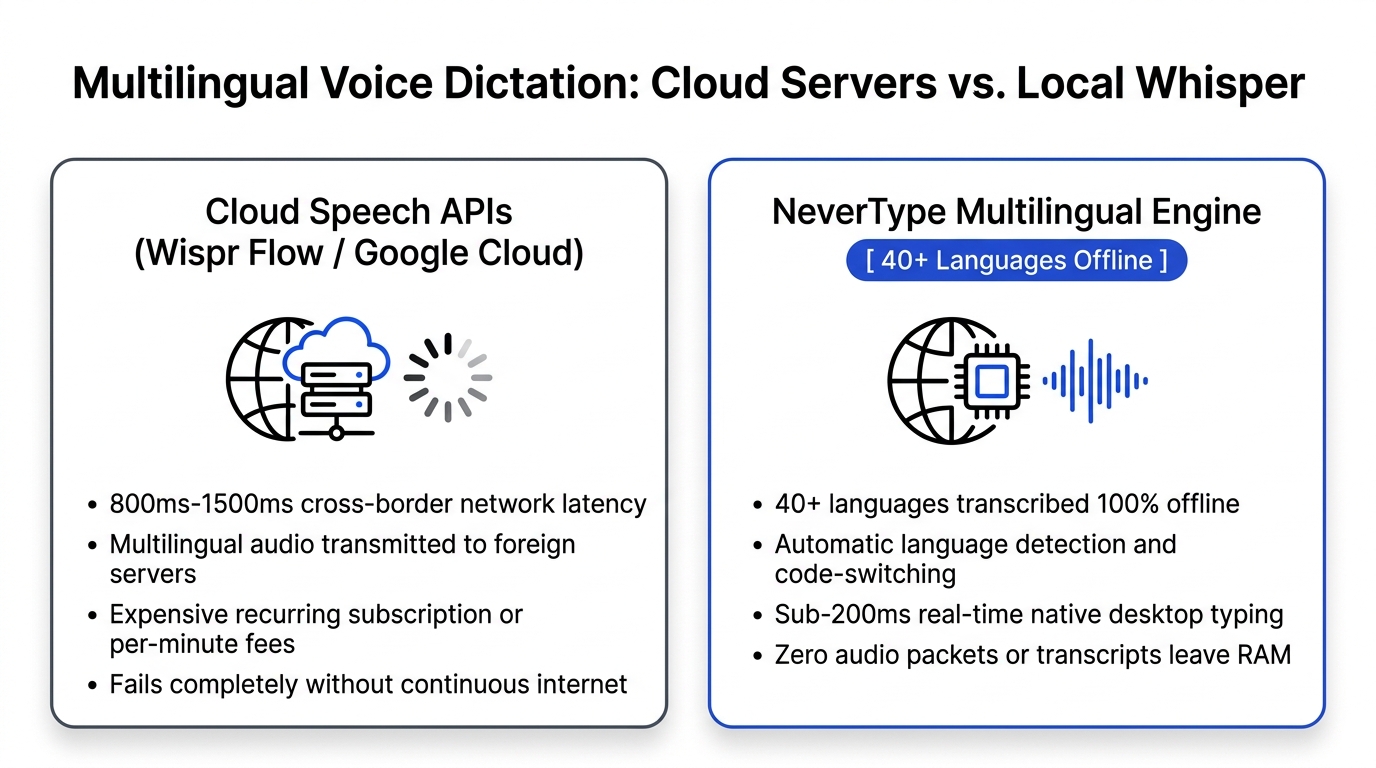
Routing microphone audio to cloud servers adds latency penalties that compound whenever you speak with an accent.
Many users frustrated with built-in operating system tools turn to cloud services like Wispr Flow or Otter.ai. While these services use neural models, sending your audio across the internet introduces two serious flaws:
1. Network Lag Destroys the Conversational Loop
When you speak with an accent, you naturally monitor the screen to ensure the computer heard you accurately. Cloud dictation apps require between 500 milliseconds and 1.5 seconds to compress your audio, ship it to a remote GPU cluster, run inference, and return the text. That delay forces you to pause, check the screen, wait for the buffer to catch up, and restart your sentence.
NeverType completes inference on your local hardware in under 200 milliseconds. The text appears on screen the instant your finger lifts from the hotkey.
2. Privacy and Data Security Risks
If you work at an enterprise, law firm, healthcare provider, or venture-backed startup, routing microphone audio through third-party servers violates non-disclosure agreements and compliance regulations.
NeverType runs entirely in volatile RAM on your machine. You can pull your Ethernet cable, turn off Wi-Fi, and work on a cross-country flight. The transcription engine performs identically because not a single byte ever leaves your computer.
6. How to Set Up High-Accuracy Voice Typing in 2 Minutes
Getting started with local voice dictation requires no voice training or pronunciation coaching.
- Download NeverType for macOS (Apple Silicon or Intel), Windows, or Linux.
- Grant microphone and accessibility permissions: On macOS and Windows, accessibility rights allow NeverType to paste text directly into whatever application has active focus.
- Select your model: The default fast model (under 500MB) offers sub-200ms response. If you handle dense biomedical or specialized legal terminology, switch to the precision model inside the Settings drawer.
- Choose your global hotkey: Bind your trigger to a comfortable key, like double-tapping
Fnor holding downRight Option. - Start dictating: Open Slack, VS Code, Notion, or Word. Hold the key, speak at your everyday pace, and watch accurate text appear instantly.
Frequently Asked Questions
Does NeverType require voice training for different accents?
No. Traditional tools like Dragon NaturallySpeaking forced users to sit through fifteen-minute training scripts to calibrate acoustic profiles. NeverType uses deep Transformer neural networks that recognize global English accents immediately out of the box with zero calibration.
Can NeverType switch between English and other languages?
Yes. NeverType includes multilingual model support covering more than 40 languages, including Spanish, French, German, Japanese, Portuguese, and Mandarin. You can dictate entirely in your native language or switch between languages without changing application settings.
Will background office noise interfere with accent accuracy?
Whisper was trained specifically on noisy real-world web audio rather than clean studio recordings. It handles air conditioning hum, coffee shop chatter, and keyboard clatter far better than legacy acoustic models. For the best accuracy in busy spaces, a directional microphone or noise-canceling headset is recommended.
Does any voice data get sent to the cloud?
Zero. NeverType operates on a strict offline-first doctrine. All neural inference happens directly on your machine's CPU or GPU (via Apple Silicon Metal, Windows DirectML, or Linux AVX-512). Your voice packets never touch a network socket.
Stop Fighting Your Keyboard
The QWERTY keyboard was designed in 1874 to slow human fingers down so mechanical typebars would not tangle. For over a century, professionals whose first language was not English bore the double burden of mechanical typing and phonetic software that refused to hear their voice.
Modern hardware is finally fast enough to understand human speech on human terms. You do not need to fake an American accent or pay $15 every month to rent a cloud transcription service.
👉 Download NeverType Free for macOS, Windows, and Linux and experience lightning-fast local voice dictation today.