
If you are an adult with dyslexia, you know the specific exhaustion that comes from staring at a blinking text cursor.
In meetings or casual conversations, your thoughts move quickly. You can explain complex product architectures, negotiate contract terms, or tell vivid stories without hesitation. You have an expansive vocabulary and strong analytical instincts.
The moment your fingers touch a keyboard, that fluency hits a mechanical wall.
Your brain has to manage two conflicting tasks at once: the high-level conceptual work of composing your argument, and the low-level clerical chore of letter ordering, phonetic spelling rules, and finger mechanics. You hesitate over whether "recommend" has two c's or two m's. You accidentally invert syllables in technical terms. You look at a completed paragraph and see red squiggly lines that make you feel like you are back in fourth-grade spelling detention.
That friction causes many dyslexic professionals to dumb down their writing. You delete an expressive, precise word because you are not sure how to spell it, replacing it with a simpler, blander synonym.
Voice dictation should be the natural bridge. For years, however, speech recognition software only added to the humiliation. Older tools like Dragon NaturallySpeaking or Siri required slow, robotic pronunciation. If you stumbled or paused to find a word, the software inserted bizarre phonetic hallucinations that required more trackpad editing than typing by hand.
Modern neural speech models changed that balance completely. When you pair on-device Whisper transcription with automatic grammar cleanup, the mechanical typing block disappears.
1. The Cognitive Split: Why Keyboard Typing Exhausts Dyslexic Brains
Keyboard typing forces dyslexic writers to divert executive function away from high-level reasoning toward letter-level orthographic decoding.
In cognitive psychology, working memory is a finite resource. When non-dyslexic typists draft an email, the physical spelling and keystroke sequencing happen almost unconsciously in the background.
For adults with dyslexia or dysgraphia, that low-level translation is never automatic:
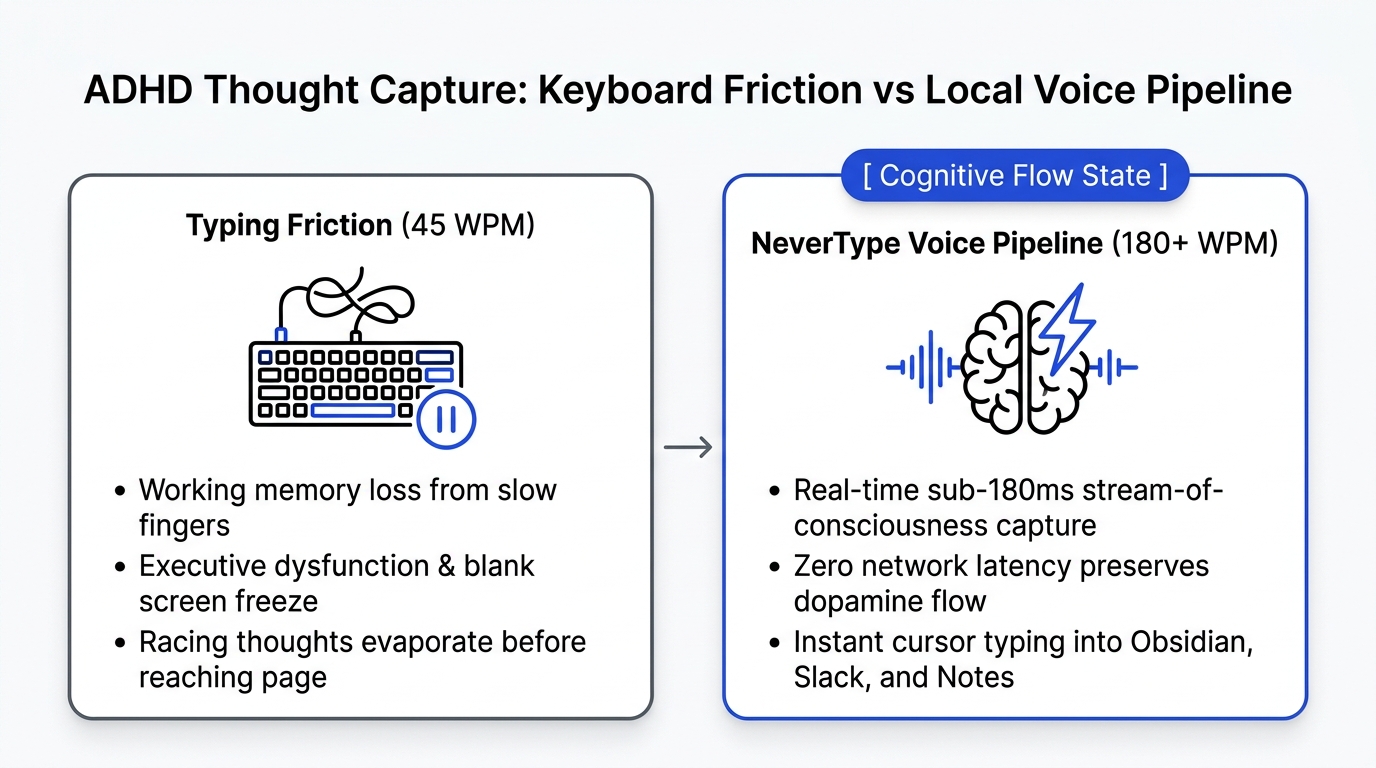
Keyboard Bottleneck for Dyslexic Professionals:
[High-Speed Spoken Thought]
        │
        ▼ (Cognitive Bottleneck)
[Orthographic Letter Decoding] ──▶ [Spelling Doubts & Syllable Inversion] ──▶ [Self-Censorship & Fatigue]

NeverType Direct Voice Path:
[High-Speed Spoken Thought]
        │
        ▼ (Zero Friction)
[Local Whisper + Instinct] ──▶ [Clean Orthography & Polished Prose at Active Cursor]
When you write by hand or on a mechanical keyboard, you constantly divert attention away from what you are saying to monitor how words look on screen. That split focus causes:
- Mental exhaustion after drafting just two or three detailed emails.
- Frequent self-censorship, where you swap rich ideas for basic sentences to avoid spelling errors.
- Time-consuming editing loops, where you re-read every line four times out of anxiety before hitting send.
Voice typing bypasses the visual-motor loop entirely. Your vocal cords speak the word you intend, and the computer handles the spelling, capitalization, and punctuation automatically.
2. Why Older Speech Tools Failed Dyslexic Speakers
Legacy dictation engines relied on brittle acoustic dictionaries that punished the natural speech hesitations and word-finding pauses common in neurodivergent speech.
Many dyslexic adults tried speech-to-text tools a decade ago and swore off the technology forever. That reaction made sense given how tools like Nuance Dragon or early smartphone dictation were designed.
Older systems suffered from three major flaws:
First, they demanded a constant, metronomic speaking tempo. If you paused for two seconds to organize a thought, the software assumed you had finished your sentence, cut off the microphone, or inserted a period in the middle of a clause.
Second, they had zero contextual comprehension. If you stumbled on a syllable or mumbled a transition sound, the acoustic model guessed phonetically similar words with absurd results. Saying "let's synchronize our calendars" frequently became "let's sink your eyes hour colanders".
Third, they required tedious manual voice training. You had to sit through twenty minutes of reading canned scripts to train acoustic profiles. If your microphone moved two inches, the accuracy collapsed again.
3. How Whisper and Instinct Restore Natural Fluency
Whisper derives words from deep sentence context rather than rigid phonetics, while NeverType's Instinct engine cleans up vocal pauses automatically.
Modern open-weights Transformer models like Whisper operate fundamentally differently from older tools. Because Whisper was trained on 680,000 hours of noisy, conversational internet audio, it expects human speech to be imperfect.
Context-Driven Spelling
If you hesitate or slightly mispronounce a technical term like asynchronous, Whisper looks at the other words in your sentence. If you just said JavaScript runtime, the attention heads resolve asynchronous with 100% accuracy. It does not require you to enunciate like a radio broadcaster.
Automatic Disfluency Filtering
When organizing ideas out loud, dyslexic speakers frequently use filler sounds or backtrack to rephrase a concept.
NeverType's Instinct engine acts as an invisible editor. It filters out verbal hesitation ("um", "ah", "like"), removes accidental phrase repetitions, and places punctuation based on your natural breathing pauses.
You speak your authentic train of thought, and clean, grammatically sound prose settles into your text field.
4. Feature Comparison: Typing vs. Legacy Voice vs. NeverType
Here is how daily writing options compare for neurodivergent and dyslexic professionals:
| Dimension | Physical Keyboard | Legacy Dictation (Dragon, Siri) | NeverType (Whisper + Instinct) |
|---|---|---|---|
| Writing Velocity | 30 to 50 WPM with pauses | 70 to 90 WPM (frequent edits) | 180 to 220 WPM fluid speech |
| Spelling Anxiety | High (constant red lines) | Moderate (acoustic misspellings) | Zero (automatic correct orthography) |
| Vocabulary Freedom | Restricted by spelling doubt | Limited to standard words | Full vocabulary expression |
| Handling Hesitations | Not applicable | Halts or inserts wrong words | Filters fillers and stumbles cleanly |
| Executive Fatigue | Severe after 1 hour | Moderate from correcting typos | Minimal (speech is natural) |
| System-Wide Use | Universal | Clunky window switching | Native global hotkey in any app |
| Pricing Model | Hardware purchase | High subscription or $500 fee | One-time lifetime ownership |
5. Daily Workflows for Dyslexic Professionals
Voice-to-text removes the hesitation from high-stakes workplace communication, allowing your intellect to show through without spelling anxiety.
1. High-Stakes Client and Leadership Emails
Instead of drafting an email in a separate notepad, running it through three spellcheck tools, and agonizing over the phrasing:
- Position your cursor in your email client.
- Hold your NeverType trigger key.
- Speak directly to the recipient as if they were sitting across the table from you.
- Release the key. NeverType inserts formatted, professional sentences with zero spelling errors.
2. Fast Slack and Chat Collaboration
Remote workplace chat moves fast. Dyslexic workers often fall behind in real-time discussions because typing responses takes three times longer than reading them. With NeverType, you can respond to technical Slack threads at 200 words per minute, contributing ideas in real time without worrying about typos.
3. Long-Form Writing and Documentation
Whether drafting product requirements, legal briefs, or book chapters, dictating into tools like Obsidian, Notion, or Google Docs preserves creative momentum. You can pace your office, speak for thirty minutes, and build multi-page drafts without wrist strain or mental blocks.
Frequently Asked Questions
Does NeverType work inside any desktop app?
Yes. NeverType operates as a system-wide input method across macOS, Windows, and Linux. You tap your configured global hotkey (like holding Right Option or double-tapping Fn), speak, and NeverType types the text directly into whichever application has active cursor focus.
Will NeverType replace my words with strange corporate jargon?
No. NeverType preserves your authentic vocabulary, tone, and sentence structure. The Instinct engine focuses strictly on removing verbal stutters, stripping filler sounds, and applying standard punctuation. It does not rewrite your voice into generic marketing text.
Can I dictate technical jargon and acronyms?
Yes. Whisper handles technical terminology, programming identifiers, medical jargon, and business acronyms natively. Because it evaluates sentence context, it distinguishes between words that sound identical based on the subject of your sentence.
Is my voice audio private?
Completely. NeverType runs 100% offline using local neural models executed on your computer's CPU or GPU. Zero audio packets, transcripts, or telemetry are ever transmitted across the internet. Your thoughts remain entirely on your machine.
Reclaim Your Authentic Voice
Dyslexia is not a deficit in thinking. It is a mechanical mismatch with an input device designed in 1874 to keep typewriter hammers from jamming.
You should not have to simplify your ideas or spend hours fixing spelling errors just to communicate with colleagues.
Modern local AI allows your computer to adapt to human speech instead of forcing your brain to adapt to mechanical keys.
👉 Download NeverType Free for macOS, Windows, and Linux and experience effortless, high-speed writing without keyboard friction today.