
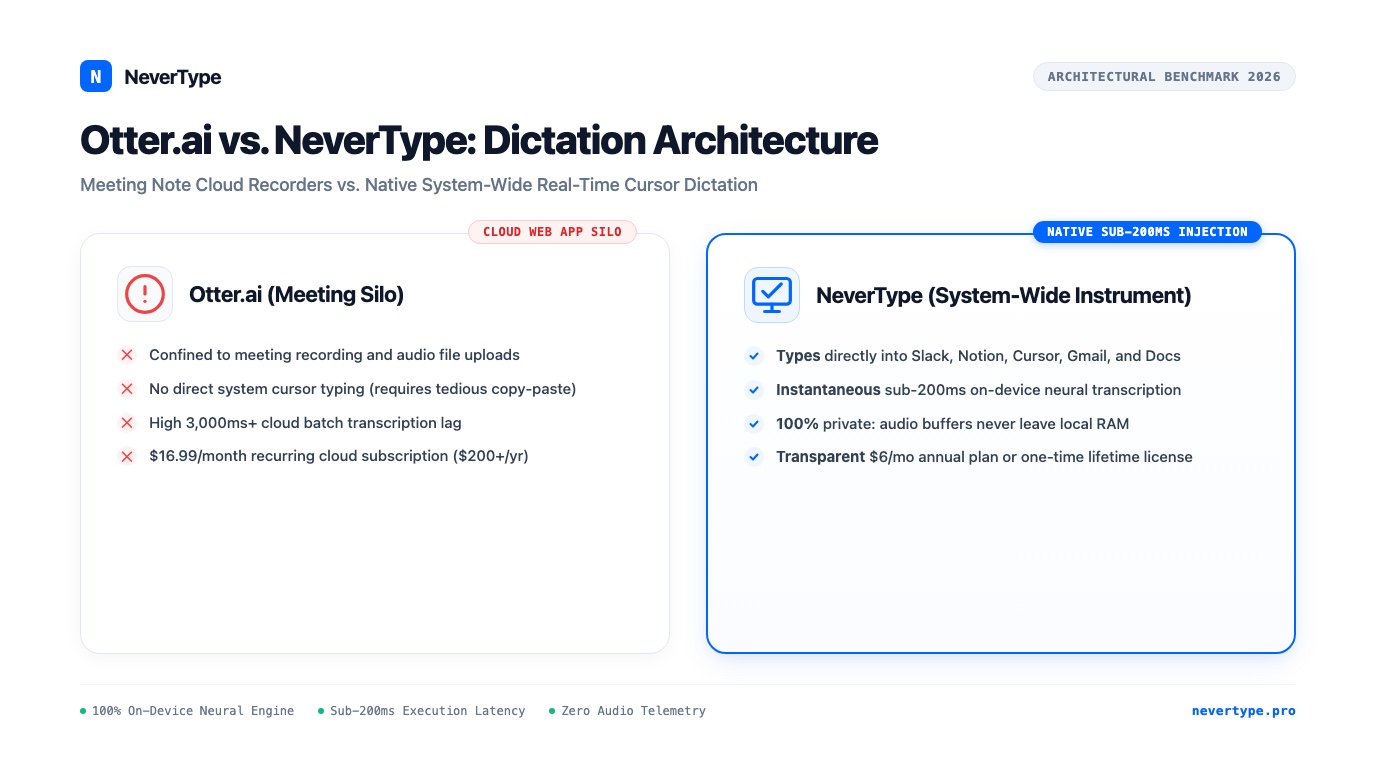
Otter.ai is built to join Zoom calls, record audio conversations, and generate post-meeting cloud summaries, but it cannot inject real-time text directly into your daily desktop applications. Professionals attempting to use Otter.ai for drafting emails, writing Slack messages, updating Notion documents, or composing code comments face high latency, painful copy-pasting, recurring $16.99 monthly fees, and serious third-party cloud data privacy liabilities.
Modern productivity demands an entirely different class of tool: an on-device, system-wide voice dictation instrument that transcribes speech into formatted prose at 220+ words per minute directly at your blinking cursor with sub-200ms latency.
Here is an architectural, economic, and practical comparison between meeting recording silos like Otter.ai and system-wide local voice instruments like NeverType.
1. The Workflow Mismatch: Meeting Bot vs. System-Wide Cursor Dictation
Otter.ai functions as an asynchronous cloud recording repository, whereas NeverType operates as a real-time system-wide input method across macOS, Windows, and Linux.
When professionals search for voice-to-text software to accelerate their daily typing, they frequently sign up for Otter.ai under the misconception that it functions as a universal speech-to-text utility. They quickly hit an operational brick wall:
The Otter.ai Copy-Paste Tax
- Open a browser tab or web app window.
- Click the recording button or invite an automated "OtterPilot" bot to your meeting room.
- Speak your thoughts or conduct the call.
- Wait 3 to 10 seconds for remote cloud GPU servers to process and stream chunks.
- Highlight the transcribed paragraph in the web portal.
- Press
Cmd+C/Ctrl+C, switch over to Slack, Gmail, or Linear, and pressCmd+V. - Manually scrub punctuation errors, missing line breaks, and awkward sentence capitalization.
This fragmented sequence consumes more time and cognitive attention than typing on a standard keyboard at 50 WPM. The context switch between your working canvas and a third-party web dashboard breaks psychological momentum.
The NeverType Native Injection Standard
NeverType requires zero browser tabs, zero recording bots, and zero copy-pasting:
- Position your cursor wherever you wish to write (a Slack reply, a Notion database cell, a Cursor IDE editor, or a Gmail compose box).
- Tap your global hotkey (such as double-tapping
Fnor holdingRight Option). - Speak at your natural speaking cadence (180 to 240 WPM).
- Text streams directly into the active OS focus field in real time.
- Lift your finger; the disfluency filter cleans pauses and filler words, instantly settling publication-ready prose.
Because NeverType interfaces directly with native operating system accessibility events (CoreGraphics on macOS, SendInput on Windows, and uinput on Linux), it operates across 100% of desktop software without integration plugins.
2. Benchmark Comparison: Otter.ai vs. NeverType vs. Cloud Dictation
Tabular evaluation reveals the fundamental architectural divergence between cloud meeting platforms and local on-device voice typing instruments:
| Evaluation Vector | NeverType | Otter.ai | Wispr Flow | Apple / Windows Dictation |
|---|---|---|---|---|
| Primary Design Intent | Real-time desktop typing instrument | Meeting recording & team notes | Consumer cloud voice typing | Built-in OS voice fallback |
| System-Wide Cursor Injection | Yes (Native OS Accessibility API) | No (trapped in web/mobile app) | Yes (Cloud WebSockets) | Yes (OS native) |
| Inference Location | 100% Local (Metal / ONNX / CPU) | Remote Cloud GPU Clusters | Remote Cloud GPU Clusters | Hybrid / Cloud Server |
| Audio Privacy & Telemetry | Zero packets leave RAM | Audio saved on Otter cloud | Audio streamed to third parties | Transmitted to Apple/Microsoft |
| Execution Latency | Sub-200ms (<140ms on Apple Silicon) | 3,000ms – 10,000ms batch delay | 500ms – 1,200ms network lag | 400ms – 800ms |
| Offline Capability | 100% Functional Offline | Fails completely without internet | Fails completely offline | Limited or fails offline |
| Pricing Model | $6/mo annual or Lifetime License | $16.99/mo ($203.88/year) | $12–$15/mo ($144–$180/yr) | Free (bundled) |
| Supported Platforms | macOS, Windows 10/11, Linux | Web, iOS, Android (No desktop app) | macOS, Windows beta | Platform-exclusive |
| Filler Word Scrubbing | Real-time local neural filter | Batch post-processing | Cloud LLM pass | None (literal transcription) |
| Syntax & Markdown Awareness | Full support (camelCase, flags) | Poor (text only) | Basic | Fails on code syntax |
3. Latency Architecture: Real-Time Flow vs. Asynchronous Batching
NeverType processes audio chunks in unified RAM concurrently with human vocalization, delivering completed sentences within 160ms, whereas Otter.ai batches speech into multi-second audio buffers for cloud ingestion.
In user interface engineering, latency governs the cognitive state of the user. Human conversational turn-taking happens at approximately 200 milliseconds. When speech-to-text latency remains under 200ms, the user experiences the illusion of direct mental manipulation—words appear as quickly as the thoughts form.
Otter.ai Cloud Processing Loop:
[Microphone] ➔ [Audio Buffer] ➔ [Network TLS Packetization] ➔ [Cloud Server Queue]
➔ [Cloud Whisper/Transducer Model] ➔ [HTTP Response] ➔ [Web UI Canvas] ➔ [Manual Copy-Paste]
Total Delay: 3,000ms – 8,000ms

NeverType On-Device Processing Loop:
[Microphone] ➔ [Volatile RAM Ring Buffer] ➔ [Local Metal / ONNX Tensor Inference]
➔ [Local Disfluency Scrubbing] ➔ [Direct OS Cursor Pasteboard Event]
Total Delay: 120ms – 180ms
When using Otter.ai, you must speak into a void, wait for a transcription server to parse the recording, and review the text in an external container. This lag makes Otter.ai useful for archiving passive 45-minute presentations, but unusable for active writing, email drafting, code commenting, or messaging colleagues.
NeverType operates inside the immediate feedback loop. Because transcription executes locally on Apple Silicon Metal or DirectML neural runtimes, there is zero internet packet latency, zero queue waiting, and zero dropped connections on congested coffee shop Wi-Fi or transcontinental flights.
4. Privacy, Compliance, and Data Sovereignty
Otter.ai stores audio recordings, voice prints, and transcripts indefinitely on multi-tenant cloud databases, creating significant legal exposure under GDPR, HIPAA, and corporate NDAs, whereas NeverType operates with zero telemetry and leaves zero trace on disk or network.
When you use Otter.ai, every spoken word—including sensitive employee performance reviews, intellectual property roadmaps, financial projections, and proprietary client data—is uploaded to Otter's third-party infrastructure. In 2023 and 2024, privacy researchers documented multiple instances of automated meeting bots joining confidential executive conversations uninvited due to automated calendar synchronization.
The NeverType Zero-Data Footprint Doctrine
- Zero Cloud Servers: NeverType has no cloud ingestion backend, no remote telemetry pipeline, and no remote transcription database.
- Volatile RAM Only: Microphone audio is streamed into temporary volatile RAM buffers. As soon as the transcription is injected into your active application, that RAM block is overwritten with zeros.
- Air-Gapped Operation: NeverType can be locked down with complete outbound firewall blocking. It will continue to transcribe at full speed without sending a single network packet.
- Enterprise NDA & HIPAA Safe: Because data never leaves your physical laptop or desktop, legal counsel and security compliance officers can approve NeverType without requiring complex Business Associate Agreements (BAAs) or multi-tenant risk assessments.
5. Economic Analysis: Perpetual Subscription Rent vs. Permanent Utility
Otter.ai charges $16.99 per month per user (over $200 per year) for a recurring cloud SaaS model, while NeverType offers an accessible $6 per month annual plan ($72/year) and a permanent one-time lifetime license.
Cloud-based transcription services must charge expensive recurring monthly fees because every second of audio you speak costs them GPU compute money on AWS or RunPod. Over three years, maintaining an Otter.ai Pro subscription costs $611.64. If you also pay for a cloud voice typing tool like Wispr Flow ($180/year), your voice software bill exceeds $1,150.
| Time Horizon | Otter.ai Pro ($16.99/mo) | Wispr Flow ($15/mo) | NeverType Annual ($6/mo) | NeverType Lifetime License |
|---|---|---|---|---|
| Year 1 | $203.88 | $180.00 | $72.00 | $129.00 (One-Time) |
| Year 2 | $407.76 | $360.00 | $144.00 | $129.00 (No Added Cost) |
| Year 3 | $611.64 | $540.00 | $216.00 | $129.00 (No Added Cost) |
| 5-Year TCO | $1,019.40 | $900.00 | $360.00 | $129.00 ($890+ Savings) |
Because NeverType executes on the dedicated silicon you already own, your transcription incurs zero external server expense. You own your software as a tactile desktop instrument, not a monthly recurring lease on your own voice.
6. Real-World Practitioner Workflows
Scenario A: Drafting High-Volume Client Communications in Gmail
- With Otter.ai: Open Otter tab, dictate thought, wait for server response, select text, copy, switch to Gmail, paste, format missing paragraph breaks. Total time: 3 minutes 40 seconds.
- With NeverType: Click into Gmail compose box, tap hotkey, speak naturally: "Good morning Sarah. Following up on yesterday's audit, the three items flagged in section four have been resolved. Let us schedule a 15-minute sync on Thursday at 2 PM to review the deliverables." Lift hotkey. Flawless text appears instantly. Total time: 22 seconds.
Scenario B: Updating Project Epics in Linear or Jira
- With Otter.ai: Dictating technical tickets fails because Otter does not understand branch names, issue identifiers, or technical formatting.
- With NeverType: Dictate directly into Linear: "Implement OAuth redirect handler for Google authentication. Verify state parameter against CSRF token in Redis session store. Tagging ENG-3401." NeverType's developer-aware lexicon correctly types technical terms and hyphenated identifiers without phonetic mangling.
Frequently Asked Questions
Can Otter.ai type directly into my desktop applications?
No. Otter.ai does not offer system-wide cursor injection. It is an asynchronous meeting recorder and web transcription repository. To use Otter.ai text in Slack, Word, Google Docs, or VS Code, you must record speech inside the Otter interface, wait for cloud transcription, and manually copy-paste the text into your target application.
Why is NeverType faster than Otter.ai?
NeverType executes 100% of speech-to-text inference locally on your device's GPU and neural engine (such as Apple Silicon Metal or Windows DirectML). It completely bypasses internet routing, DNS lookups, audio compression, and cloud queuing, achieving sub-200ms response times compared to Otter.ai's 3,000ms to 8,000ms batch delay.
Does Otter.ai work offline?
No. Otter.ai requires an active, high-speed internet connection to transmit audio to remote servers for speech recognition. In contrast, NeverType operates completely offline without internet connectivity, allowing continuous 200+ WPM voice dictation on airplanes, in remote locations, and inside air-gapped corporate facilities.
Is NeverType safer than Otter.ai for proprietary or confidential business data?
Yes. Otter.ai stores recordings, voice prints, and transcripts in cloud databases subject to third-party sub-processors and potential legal subpoenas. NeverType operates on a strict zero-telemetry policy: all audio processing remains in volatile system RAM, zero audio packets leave your computer, and no transcripts are ever saved or monitored.
How much money do I save using NeverType instead of Otter.ai?
Otter.ai costs $16.99 per month ($203.88 per year). NeverType costs $6 per month on an annual plan ($72/year) or offers a one-time lifetime license. Over three years, using NeverType saves you between $395 and $482 compared to Otter.ai while providing instant system-wide typing.
The Verdict: Keep Otter for Meetings, Choose NeverType for Writing
If your primary objective is recording 60-minute boardroom conferences with four remote participants, meeting bots like Otter.ai serve an archival purpose.
However, if your goal is personal productivity—writing emails, drafting strategy documents, responding to messages, taking notes in Obsidian, and drafting code at 220 words per minute without physical fatigue—Otter.ai is the wrong architecture.
NeverType gives you a private, instantaneous desktop instrument that turns your natural speech into written reality directly wherever you work.
👉 Download NeverType Free for macOS, Windows, and Linux — Experience instantaneous 220+ WPM voice typing with complete privacy today.